K100D with Bower M42 adapter

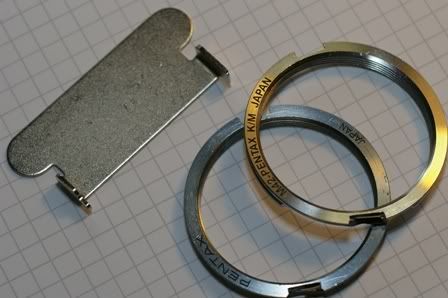 Left to Right
1. Tool for 3rd party adapter
2. Genuine Pentax adapter not needing tool
3. General adapter such as Bowers from BHPhoto
- PentaxScrewMountAdapters -- very useful to read for installation
- Pentax K100D User Manual PDF
- FL (focus lock) with S lens used
- default is 'Not Available, you need to turn this to 'Available' so that AF confirmation can be obtained in M42 lens
- Using Aperture Ring
- default is 'Prohibited' and you need to turn this to 'Allowed' so that aperture can be metered in stopping down with the M42 lens.
Upon turning on the camera with a M42 lens mounted, a focal length confirmation is shown on the screen, and one needs to adjust the value to the closest focal length. This is important for the SR calculation to work. If you have a manual zoom lens, set the value to the closest value that you are likely to use. If you change your mind to use a wider or longer zoom, you can always turn off the camera and reset it upon the next power on. Or one can use 'Menu', followed by Up arrow to get to the SR focal length selection setting to reset the focal length. I personally use a setting lower or equal to the zoom length to avoid unnecessary SR.
Update with warning:
Related Links & Posts:
- Bowers M42 Adapter from BHPhoto -- Hin's post on m42 adapter
- PentaxScrewMountAdapters -- very useful to read for installation
- Knowledge on M42 in Pentaxforums -- very useful, may require membership to view
- K10Book page on M42 -- recent k10 and k100 book with information on m42 adapter
- dpreview thread on M42 adapter
- Custom Settings required for M42 lens -- Hin's recollection of two custom settings in k100D
- Pentacon 50mm f/1.8 lens -- how bowers m42 adpter flushed onto k mount in k100d
- Pictorial Guide to M Lens -- Great tutorial in dpreview thread on metering and focusing
- How to convert Pentax M42 to K mount lens -- Hin's first attempt
- Genuine Pentax M42 to K Adapter -- Hin's documentation on Genuine adapter


0 comments:
Post a Comment