Showing posts with label canon 8800F. Show all posts

The Ricoh Love With Ricoh XR-P

2011-11-21
The Ricoh Love With Ricoh XR-P
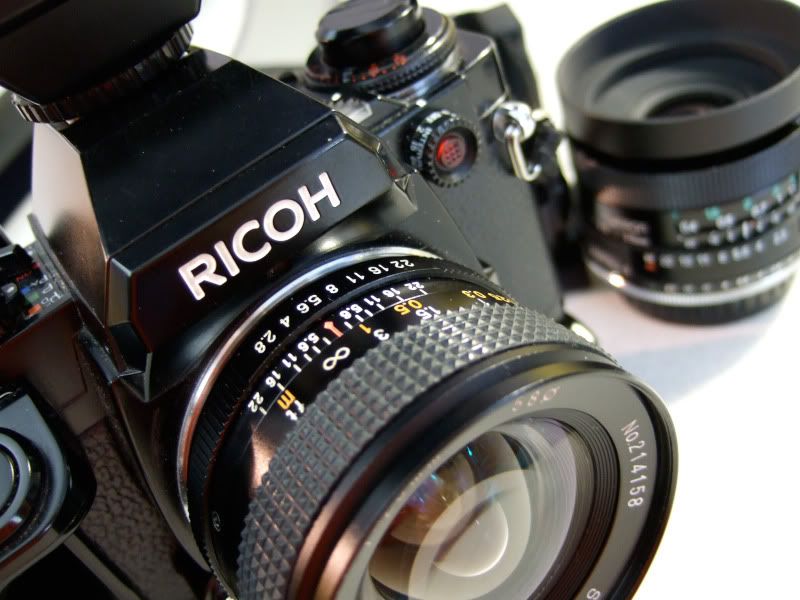
I like to post something that is related to Pentax's mother company Ricoh. It is perhaps not well known to some of us as compared to Pentax in the film days but I have been shooting the Ricoh xr-p for quite a while. While I am still a big fan of Pentax metal film bodies like MX and SuperProgram, I actually sold all of my Pentax film bodies but I keep my Ricoh xr-p as my single 35mm film body

I almost traded it to friend when I wanted to purchase his Pentax auto 110 kit. And here are some recent shots with Ricoh xr-p. I did struggle with scanning at home with my limited Canon Flatbed 8800F scanner.

My tools:
  • Ricoh xr-p
  • Vivitar 24mm f/2.8 P/K-AR
  • Kodak BW400CN
  • Home scan with low resolution for 1200dpi with Canon 8800F
  • Dwayne's Photo for film development


#1
The Ricoh Love With Ricoh XR-P


#2
The Ricoh Love With Ricoh XR-P


#3
The Ricoh Love With Ricoh XR-P


#4
The Ricoh Love With Ricoh XR-P


#5
The Ricoh Love With Ricoh XR-P

I should have tried setting ISO to 200 as I was told by my local film shop that the BW400CN is native in 200 though labelled for 400. Most of the indoor shots come out way underexposed and I have a difficult time to pull up lighting in post processing.


The Ricoh Love With Ricoh XR-P

Impressions & Notes
  • The viewfinder is not as big as the Pentax MX but the display of information as in aperture, shutter, warning of inaccurate shutter in Tv mode really make it a beauty to use with confidence
  • The Ev compensation and shutter to 1/2000 with mode dials on top is so much better than the tiny buttons toggle on SuperProgram or the like in ME Super
  • Metering is always a breeze with the Ricoh. I am yet to try its TTL flash
  • The shutter sound is very different than the Pentax. One may not like it as it has a high pitch noise but I much prefer it over the mechanical shutter in Pentax film bodies. It is quieter for street shooting as the high pitch noise is not as noticeable as the clunk in other film bodies.
  • The optional hand-grip really helps me in the shooting. The Pentax has a thinner and sturdier bodies in MX or the like, but the optional grip in xr-p wins me over for steady shot with confidence. Most of the shots that I posted are slower than 1/30 second hand-held. The shots in #1 and #2 are in 1/30 and 1/10 sec as it is a no-windows interior room in shot #2.
  • I have two lemon copies of xr-p and it shows that shutter mechanics break as easy as in any other brands.
  • The AEL button will light up the optical viewfinder with all the electronic display for shutter and aperture and I find the viewfinder especially good for low light and night time photography with film.
  • One usual gripe is in the peeling of its leatherette body in the xr-p and mine is unusually clean and intact with minor marks on the strap lug.

Related

Canon 8800F Film Scanner with 120 Film

2010-04-05
Canon 8800F scannerI developed my first roll with Fuji Pro 400H from Foto Express in San Jose and I tried for the first time scanning the 120 negatives using the Canon scanning software. On my first trial, I have to admit various unknowns as I am not yet familiar with the process. I managed to get the scanner to perform all the auto cropping and I set "Medium" for handling on dust and scratches. I used 4800 dpi in the beginning and I later turned into smaller dpi with 2400 dpi. The size for the 4800dpi goes about 18Mg whereas the size of the 2400dpi scan goes about 3 to 5 Mg.


In 2400 dpi
Pentax 645N, canon 8800F, fuji pro 400H test shot
In 4800 dpi
Pentax 645N, canon 8800F, fuji pro 400H test shot


In 4800 dpi
Pentax 645N, canon 8800F, fuji pro 400H test shot
In 2400 dpi
Pentax 645N, canon 8800F, fuji pro 400H test shot
in 4800 dpi
Pentax 645N, canon 8800F, fuji pro 400H test shot
All photos shot with Pentax 645N and
Pentax 645 FA 45mm f/2.8

Impressions & Notes

  • I am somewhat doubtful on my path into Pentax 645N as I contemplate the idea of exploring film with just a simple 35mm camera such as my Ricoh xr-p or Pentax MX
  • I have not tried the Canon 8800F on 35mm, I will report later on. I have high hope on its film scanning with b&w and color films that I did with the Ricoh xr-p. Slides will be the next endeavor when I manage well with film.
  • The 4800 dpi scan takes quite long as in 8 to 12 minutes for a single picture whereas the 2400 dpi takes about 4 minute in my old Dell system that is 5 year old.
  • The dust and scratch removal seems to work to a certain degree on the Canon 8800F flatbed scanner. But when I look at the original picture in the scan, I still see quite a number of dust spots and small scratches easily
  • I have not used all the controls in the scanning
    • Auto Tone -- I turned that ON in initial trial. I later learn and try to turn Auto Tone to OFF and rely on post processing in Lightroom
    • Bright Light Correction -- always OFF
    • Dust/Scratch removal -- I used Medium. I have this ON for past proofing and it works quite well especially on color or C41 film such as Kodak BW400CN.
    • Unsharp Mask -- I turned that on in the trial. Later on, I have this OFF and rely on LightRoom instead
    • Grain Correction -- I turned that off
  • After my 1st roll, I like the performance and color in the Fuji pro 400H with landscape shots. My local lab with Foto Express in San Jose also recommends the film and it costs less than the other color film that I look up.
  • After scanning the 645N films, I also did several trials on 35mm black and white film with Kodak BW400CN on the Canon 8800F scanner, I find results are not as good and satisfactory. For one, the 8800F scanner don't have 'dust and scratch removal' on BW negatives. I scan in 16 bit gray scale in 1200 and 2400 dpi in color negative and results don't seem to appeal me so far.
  • Instead of the Canon ScanGear driver, I tried out the free version of VueScan but so far, I don't follow the logic in VueScan and I find the Canon ScanGear working more intuitive and faster than the VueScan. I know everyone praise about the VueScan and I am going to keep trying.
  • I have seen great results, most with MF cameras in using 8800F, I visit this Flickr Canon 8800F scanner group for inspiration

Related:


About

Welcome to Hin's Photo Corner, this is my learning blog on photography, blogging and advertising. And I hope you enjoy your visit. For contact, please comment in blog post or email me directly hintheman at gmail.com.


B&H Best Deals

Statcounter